Real Work, Handed to AI: How Three Fleet Managers Use Assistants and Agents
Fleet managers in Salem, Prescott Valley and Flagstaff are using AI assistants and agents to write policies, automate work orders and double-check the results. They share how it works, where it falls short and what to watch for.
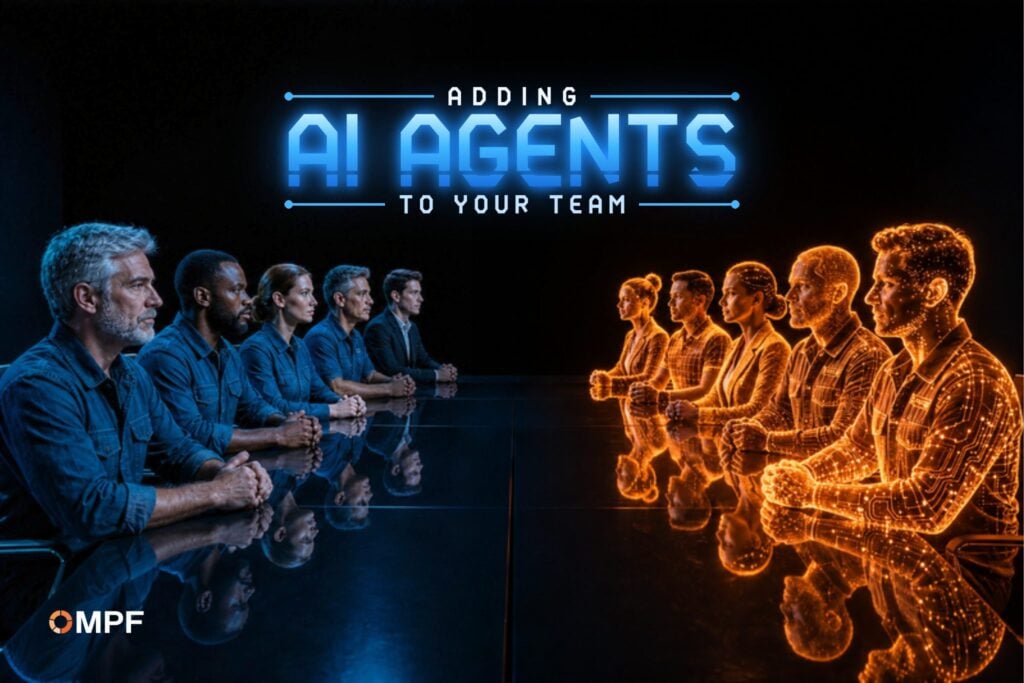
We’ve talked to a lot of fleet managers about artificial intelligence — specifically, how they’re using readily available large language models like ChatGPT, Claude, Copilot or Grok in their operations. Responses have been mixed, ranging from hesitancy to enthusiasm.
Fleet professionals are using AI to improve their written communication, such as writing and editing emails and memos. Some are using it for research or to summarize lengthy documents and government rulings. Others are using it to generate code and draft exam questions. Still others aren’t using it at all. The agency they work for might not have authorized AI use.
But some fleet professionals are going further, using AI to take on more complex tasks. From full-on drafting presentations to automating administrative tasks, we talked to several fleet managers who are successfully experimenting with AI.
A Fleet Assistant in Salem

Jim Schmidt, CAFM, fleet and facilities manager for the City of Salem, Oregon, has an advantage when using AI: he’s also the acting IT director. Another plus: The city manager, who is the former IT director, is a strong proponent of AI. With IT often overseeing AI use, Schmidt has fewer hurdles to overcome.
“I’m in it every day, all day long. I find it fantastic and terrifying at the same time,” he said about his ChatGPT assistant.
His AI assistant helps him with operations, including the usual communications like emails, memos and reports. He uses it as a sounding board to brainstorm ideas. It also helps him write plans, standard operating procedures and policies.
Tasks that took him weeks of research and hours to put together are now done quickly. One example: It reviewed fleet management information system reports and compared them against internal spreadsheets, finding anomalies that turned out to be billing errors.
“I thought, holy cow. I would have spent hours — mind-numbing hours — reviewing transaction data and using pivot tables to find those things. And it does it in seconds,” Schmidt said.
He reviews everything before approving it, and Schmidt says he has to give it clear instructions, context and guardrails so it gets it mostly right the first time. But the more he uses it, the more it understands what he wants — so it’s been producing better results.
Saving Time on Writing Policies
Schmidt asked his assistant to write an idle-reduction policy, giving it information about the fleet, telematics data, additional context and goals. He revised the draft and presented it to the executive team, including how it could save the city money. The presentation and policy helped sell the story, and it was approved for implementation. The best part: It took him an hour instead of five to six hours to complete.
An ignition-off policy turned out to be more challenging to implement than anticipated, and as gas prices decreased, so did interest. Although the policy was “a flop,” with gas prices up again, Schmidt said he anticipates renewed interest.
Another project Schmidt turned to AI for help on was vehicle utilization. He wanted to right-size the fleet and asked it to create a return policy for vehicles not used for more than 30, 60 and 90 days in one year. He pushed it to leadership, emphasizing that getting rid of underutilized vehicles would lower overall expenditures.
This policy was a success. User departments turned in six vehicles the first year and 12 the second year. They’re on track to turn in about a dozen this year as well, Schmidt said.
A Tool for Techs
Schmidt hasn’t limited AI use to the office — he’s also hoping it will help in the shop. The city has an internal AI tool called SalemGPT for city staff to use, and the IT team configured the Fleet Assistant specifically for fleet technicians. Techs enter the vehicle’s year, make, model and operator complaint. The assistant provides a list of common problems, recommended diagnostic steps, tools needed and potential solutions, giving techs a starting point for diagnosing unfamiliar vehicles. The idea is to save techs time so they don’t have to research the problem.
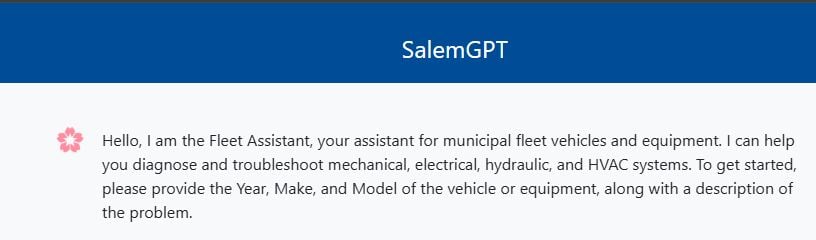
The best part: It tracks the diagnostic steps techs took, what they found out, what parts were replaced, etc., taking notes that techs can copy and paste into work orders in the fleet management information system. This is a task techs hate, Schmidt said.
Still, the pilot, pushed out to lead technicians first, has met with some resistance.
“They don’t necessarily trust it, which is fair,” Schmidt said.
One reason: SalemGPT doesn’t have information after April 2024, and it purposely doesn’t have web access to get newer information. An update would take two months.
Schmidt is working with the IT team to tweak it to make it more useful. His main goal is to give techs a starting point when a vehicle comes in, rather than going in blind. The fleet has almost 1,200 assets, and they’re varied. The nine technicians can’t be specialized in all the different types of vehicles they have to repair, he said.
Work with IT
Schmidt said the city hasn’t connected ChatGPT to its emails, Teams or telematics systems yet and won’t do so until they can verify where the data is stored. He also advises not putting personally identifiable information in the program.
Schmidt stresses that fleet managers must work with their IT departments to understand their threshold for using AI. And if IT says no, ask what else you can use. The department might have something they haven’t shared with everybody yet.
Putting AI Agents to Work in Prescott Valley
In the Town of Prescott Valley, Arizona, Daniel Yates, fleet services manager, is using AI to make up for some of the limitations of the town’s fleet management software, which is a public works system that lacks some fleet-specific capabilities. With about 350 vehicles and pieces of equipment and a staff of three technicians, Yates has been looking for ways to reduce his administrative work since he joined the town this year.
Fleet Agents at Work
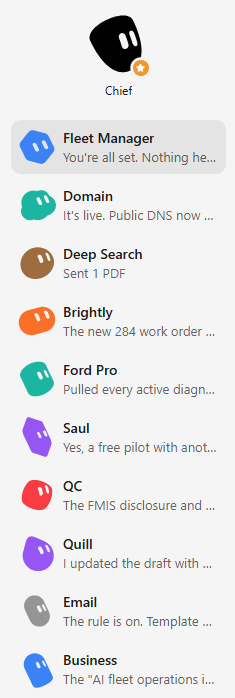
Most people are familiar with generative AI, which responds to questions and generates content. In contrast, AI agents can carry out tasks, such as entering information into software, updating records or scheduling appointments. Yates has close to 30 of them working for the fleet, each assigned a specific responsibility. They talk to each other, just like a team of digital workers.
Yates has given his agents names related to their roles:
- Chief is the chief of staff, overseeing all the agents. Yates normally communicates with this agent, which assigns tasks to the other agents.
- Brightly works with the town’s asset management system to create, update and close work orders.
- Ford Pro pulls mileage from telematics data and sends it to Brightly to update.
- Fleet manager researches industry information, including best practices.
- QC handles quality control, checking the work of the other bots for inaccuracies, duplicates and missing information.
Creating the agents is one thing. Getting them to do what he wants is another.
Yates compares training AI agents to training an incredibly intelligent toddler, one who has “read the internet front to back and knows everything there is to know, but he doesn’t know how to interact in our society.”
He gives his agents specific instructions and directs them to industry publications, blogs and forums to help them find relevant information.
Automation Reduces the Workload

One task Yates has been able to automate is work orders. He wanted to prevent techs from having to log in to the asset management system for data entry.
The new process works like this:
- The technician completes a simple online form with basic vehicle information. They can access it via their phone or computer, and they can upload parts invoices and PM sheets.
- The Brightly agent logs in to the asset management system and inputs the information, including repair details, labor, parts costs, etc., pulling data from photos if they’re included.
Yates added that this reduces data entry for techs and makes the existing software easier to use without replacing the whole system.
“My goal is to take the mechanics off the computer completely, keep them working on the cars,” Yates said.
Another automation is preventive maintenance scheduling. This process used to take several manual steps, from reviewing monthly PM requirements from the asset management platform to scheduling them in Outlook to notifying departments and following up on appointments. Now, the AI agents do all this, even drafting the necessary emails and putting them in Yates’ Drafts folder, which Yates reviews before sending. They also draft emails about missed appointments.
“I’m starting to watch my Draft folder just as much as I’m watching my Inbox,” he said.
He’s also been able to automate mileage data entry when the fuel bill comes in every other week, a task a public works administrator used to handle. What used to take hours now takes about 10 minutes. The agents have also helped him quickly identify two fuel cards being used that were tied to retired vehicles, allowing him to cancel them.
When AI Agents Make Mistakes
Yates admits his AI agents make mistakes. The quality control agent, for example, catches duplicate entries and missing information. This need for oversight is partially why he reviews every single email and hits “send” himself.
“It knows everything, but it makes mistakes, so you’ve got to watch it,” Yates said.
Yates has to use some workarounds for the Grok AI agents, but the town is seeing the benefits. The IT department and town management recently approved piloting Grok Bot throughout Public Works.
In Flagstaff, AI Comes with a Checklist

Jennifer Brown, fleet director for the City of Flagstaff, Arizona, believes some fleet professionals are concerned about AI replacing jobs, while others may be intimidated by the technology. She thinks some are even reluctant to admit they’re using AI, but the number of fleet users is growing.
Brown uses AI in her operation, including preparing reports and presentations, but she’s also careful about its output.
“If I have writer’s block, I can just put in a couple of things, and then it gets me started,” she said. She also uses it to get her information in one place and will ask the AI to help her with a draft.
She has also found errors in the information it produces, which is why she emphasizes the importance of checking its work, especially when using that information to make fleet decisions.
“You can’t just say, ‘This AI bot is just doing all my work for me,’” she said. “You still have to check your work and know what you’re putting out there because it’s still a reflection on you.”
With Claude, Brown developed a four-question checklist to help users evaluate AI-generated information and shared it with fleet professionals. She calls it VOCA.
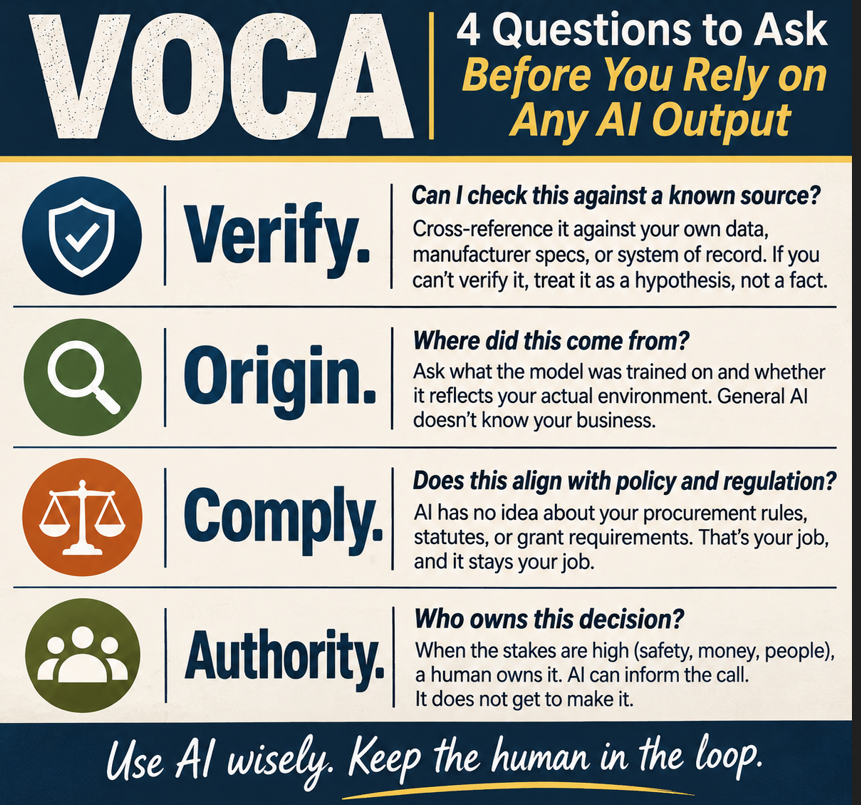
Brown worries about people becoming overreliant on AI. They might ask AI to draft an acknowledgment email, producing a paragraph of text when a single personally written sentence would have done the job. Sometimes, she says, it’s easier to do the job yourself.
Learning as They Go
None of these fleet managers are developers, but they’re finding ways to use the technology to handle tasks that once took hours, address gaps in their existing software and help technicians do their jobs.
“I’m a carpenter at my core. I’m not a developer. I don’t do code,” Schmidt said. “If I can do this, anyone can do this.”
Quick answers
What is the difference between generative AI and AI agents?
Generative AI responds to questions and generates content, while AI agents can carry out tasks such as entering information into software, updating records or scheduling appointments. In the Town of Prescott Valley, Arizona, Daniel Yates, fleet services manager, has close to 30 agents working for the fleet, each assigned a specific responsibility.
How should fleet managers handle data security when using AI tools?
Jim Schmidt, CAFM, fleet and facilities manager for the City of Salem, Oregon, stresses that fleet managers must work with their IT departments to understand their threshold for using AI. Salem hasn't connected ChatGPT to its emails, Teams or telematics systems and won't until it can verify where the data is stored. He also advises not putting personally identifiable information (PII) in the program.